| Week | Academic Focus | Application & Outcomes |
|---|---|---|
| Week 1 | Introduction to 3D Space (Blender) | Getting comfortable. Mastery of Blender's UI, camera navigation, and learning how to move, scale, and rotate basic 3D shapes (cubes, spheres, cylinders). |
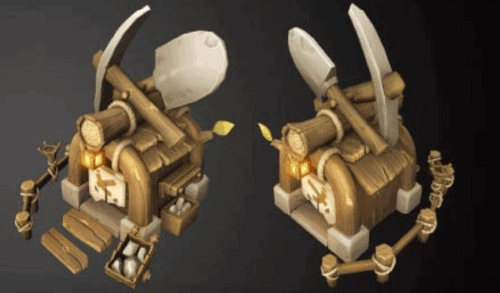
| Week 2 | Basic Prop Modeling | Learning to edit shapes. Using simple extrusions and loop cuts to build a blocky, low-poly prop (e.g., a simple sword, shield, or magic wand). |
| Week 3 | Refining the Prop | Introduction to basic Modifiers (like Bevel to soften edges) and organizing files properly. Finalizing the shape of the simple prop. |
| Week 4 | Introduction to Digital Sculpting (ZBrush) | Transitioning to ZBrush. Learning the interface, basic tablet navigation, and experimenting with the Standard, Move, and Smooth brushes on a ball of digital clay. |
| Week 5 | Sculpting a Simple Character | Using basic spheres and the Move brush to block out a very simple, stylized character (e.g., a simple mascot, snowman, or cute creature). |
| Week 6 | Introduction to UVs & Coloring | What are UVs? A beginner-friendly look at flattening 3D shapes. Assigning basic, flat base colors to the prop and character. |
| Week 7 | Basic Digital Painting (Blender) | Adding simple painted details (like eyes, simple fabric colors, or wood grain) to the models using straightforward brushing techniques. |
| Week 8 | Bringing it Together | Exporting the character from ZBrush into Blender. Positioning the character and the prop together in one scene. |
| Week 9 | Basic Lighting & Materials | Setting up a simple 3-point light system (Key, Fill, Backlight). Adjusting basic material sliders (making things look shiny, matte, or metallic). |
| Week 10 | Final Image Render & Review | Using the camera in Blender to take a simple, clear "photo" (render) of the completed character and prop. Final celebration and review of concepts learned. |

Character and Props Foundational Core Course
Duration:
12 Weeks (12 Sessions) | 2.5 Hours per Session (30 Hours Total)
Theme :
Build core competencies
Programme Description :
- This foundational core course introduces students to 3D modelling fundamentals, including polygonal modelling, UV unwrapping, and basic sculpting.
- The curriculum focuses on building practical skills through the creation of simple assets and provides a baseline understanding of digital painting and game development theory.
Learning Focus:
3D Modelling and Sculpting (starting with simple props/characters), alongside Digital Painting and Texture Fundamentals.
Learning Emphasis :
- Polygonal modelling, UV unwrapping, basic sculpting
- 3D Modelling and Sculpting (starting with simple props/characters)
- Digital Painting and Texture Fundamentals
- Introduction to AAA Game Theory
Expectations and Goals
Upon completion of this course and its assessments, students are expected to:
1. Execute simple asset creation (e.g., transforming 2D sketches into basic prop models within 4 weeks).
2. Build core competencies through targeted small-group instruction.
3. Actively complete weekly challenges and participate in real-time Q&A sessions.
Software Tools
- Blender
- ZBrush
- Photoshop
Academic Delivery & Workload Framework
Delivery Model
- This module is delivered over a 12-week academic period.
- The delivery uses a structured combination of studio-based instruction, guided software demonstrations, and
supervised asset production practice.
Instructional Hours
- Students are required to complete mandatory instructional hours based on a framework of 2.5 hours per week. These hours consist of guided studio instruction, technical demonstrations, applied modeling exercises, structured critique sessions, and formal assessment activities.
- Additionally, students may access up to 3 hours per week of optional supervised studio lab time to extend
their asset production work and refine technical workflows.
Independent Learning Expectation
Students must undertake independent study and project development outside of scheduled instructional sessions,
including reference gathering, topology iteration, software tool practice, and weekly challenge completion.
Attendance Requirement
- Students are required to attend a minimum of 80% of the mandatory instructional hours to maintain eligibility
for assessment and progression. - Any attendance at the optional supervised studio sessions does not count toward this 80% requirement.
| Assessment Component | Weighting | Description/Key Expectations |
|---|---|---|
| Software Familiarity & Basic Application | 30% | Demonstrates clean topology, proper edge-flow, efficient UV packing, accurate map baking, and seamless asset transfer between Blender, ZBrush, and Photoshop. |
| Weekly Practical Exercises | 40% | Completion of basic weekly tasks. Grading is based on effort, following instructions, and progressing step-by-step rather than complex artistic detail. |
| Beginner Final Project | 20% | Delivery of a rendered image showing a simple, colored character and prop in a lit Blender scene. |
| Participation & Attendance | 10% | Asking questions, engaging in the classroom, and adhering to the 80% attendance requirement. |
Final Discretion: McTecc International Ltd. reserves the right to modify course content, schedules, and fee structures without prior notice, and holds the right of final decision in all matters pertaining to the programmes.
Ready to Level Up Your Skills?
Beginner or professional, our hands-on courses take you from fundamentals to advanced techniques using industry tools like Maya and Substance Painter. Through a blend of lectures, workshops, and portfolio reviews, our instructors guide you from initial sketches to polished final proposals. You’ll gain access to practical studio resources, professional tools, and real career feedback.
Embark on your path to AAA-level excellence and accelerate your future. Sign up now and elevate your artistic mastery!
Get in touch
Get In Touch
Interested in our programs or partnerships? Reach out and we’ll guide you through the next steps.